

How to Use Google Business Profile for Local Search Visibility: The Strategic Power of Keyword Tracking
In the digital-first world, local customers are more likely to discover your business through a quick online search than by walking past your storefront. For small businesses, franchises, and agencies managing multiple local brands, your Google Business Profile (GBP) is a make-or-break factor in winning local attention and conversions. Yet optimizing your profile is only half of the battle—you also need keyword tracking to measure real impact and fine-tune your strategy for sustained, data-driven growth.
This comprehensive guide unpacks how to use Google Business Profile to increase your local search visibility, why keyword tracking is essential for monitoring your success, and how agencies and multi-location businesses can scale their optimization efforts for outsized ROI.
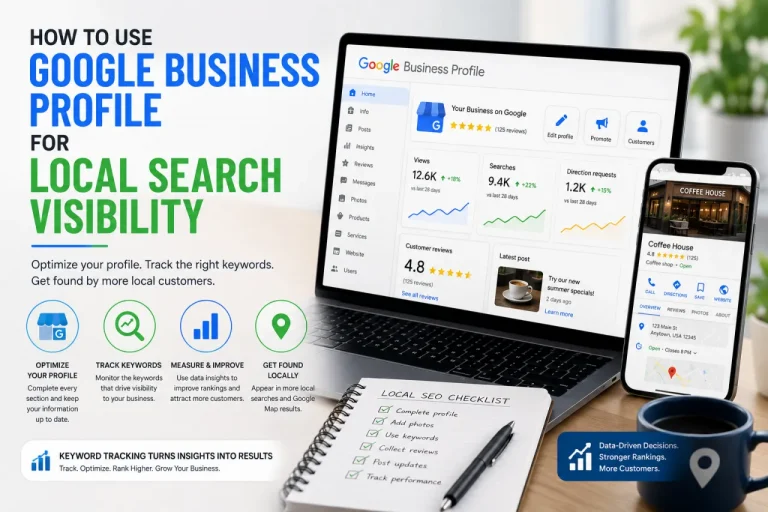
Introduction: Google Business Profile and Keyword Tracking—The Modern Local SEO Blueprint
Standing out in local searches isn’t about luck or hope—it’s about smart decisions and constant measurement. Your Google Business Profile is today’s local directory listing, reviews platform, and “digital storefront” rolled into one. The info you provide, the updates you make, and the engagement you generate all send important signals to Google.
But many businesses—and even agencies—fall into the “set it and forget it” trap: They claim their profile, fill out some details, and move on. With evolving search algorithms and fierce competition, this isn’t enough. Continuous optimization, paired with robust keyword tracking, is the blueprint for ranking higher and reaching more customers.
Keyword tracking lets you measure progress, spot local opportunities, and allocate your resources to tactics that move the needle. The businesses that thrive are those who combine Google Business Profile expertise with the actionable data keyword tracking provides.
What Is Google Business Profile—and Why Does It Matter for Local Search?
Your Profile Is “Home Base” for Local Search
Google Business Profile (formerly Google My Business) is the official business listing platform for Google. Imagine it as your verified summary card, showing up in local map results, the Google Local Pack, and to users searching for businesses “near me.”
Your profile consolidates:
- Business name, address, and contact info (NAP consistency)
- Category and service details
- Operating hours
- Photos and videos
- Customer reviews and ratings
- Posts, Q&A, and updates
How Google Uses Your Profile for Search Rankings
Google’s local algorithm weighs relevance, distance, and prominence—a trio that translates to:
- Are you offering what the searcher wants?
- Are you close to the searcher?
- Are you a trusted, popular option (reflected in reviews, citations, and online activity)?
But knowing how well these profile elements perform for the keywords that matter to your business requires robust keyword tracking.
How Keyword Tracking Supports Your GBP Optimization Strategy
You can optimize your profile in a dozen ways—adding photos, updating categories, or requesting reviews—but unless you’re tracking your rankings for target keywords, you’ll never know what’s really effective.
The Role of Keyword Tracking in Local Search
- Measure improvement: Monitor if updates move you higher for specific searches, like “family dentist in Miami” or “pet store near Central Park.”
- Spot sudden changes: If you’re outranked after a competitor updates their GBP, keyword tracking lets you know before lost leads become a problem.
- Uncover new opportunities: Identify niche or long-tail keywords driving qualified local traffic.
- Justify your work: Deliver clear reports and ROI stats to stakeholders or clients.
Creating a High-Performing Google Business Profile
Let’s break down the step-by-step process for using GBP for local visibility—while integrating keyword tracking every step of the way.
1. Claim and Verify Your Profile
This foundational step can’t be skipped. Ensure ownership so you can update, respond to reviews, and monitor analytics.
Pro tip: Use keyword tracking before and after claiming (if possible) to measure the profile’s initial impact on rankings.
2. Fill Out Your Profile Completely
Be meticulous with:
- Business Name: Exactly as it’s recognized.
- Address & Phone: Consistency is key—match all other listings.
- Category & Description: Primary and secondary categories, with naturally placed target keywords.
Keyword tracking will help you see which changes lead to ranking improvements for your chosen service or product search terms.
3. Add High-Quality Photos and Videos
Businesses with recent, attractive images get more clicks and conversions. Go beyond stock shots to include team photos, storefronts, menus/services, and happy clients.
Track visibility spikes for keywords after uploading new media.
4. Specify Services and Products Offered
The more granular your service and product list, the more likely Google will match you to local “near me” searches.
- Use descriptive, keyword-rich names and details for each.
- Monitor rankings for new service keywords with your tracking tool.
5. Set Accurate Business Hours & Special Attributes
Update for holidays, special events, or changes (e.g., curbside pickup, delivery availability).
6. Request and Manage Customer Reviews
- Consistently ask happy customers for reviews.
- Respond to all feedback, especially negative comments.
- Use review language that incorporates your main keyword and service area naturally.
Keyword tracking lets you see if a surge in positive reviews correlates with improvements for key phrases.
7. Post Regularly to Your Profile
Utilize the “Posts” feature to share promotions, events, or news. Each post is an opportunity to include target keywords and foster engagement.
- Track which types of posts boost your local rankings in conjunction with keyword tracking data.
- Adjust strategy based on what brings measurable search movement.
8. Monitor and Respond to Q&A
Proactively answer common questions about your services, parking, accessibility, or products.
Monitor ranking changes as you address trending topics, leveraging keyword tracking to target more specific queries.
Integrating Keyword Tracking Into Your GBP Workflow
Setting Up Keyword Tracking
- Choose a platform that allows granular tracking by location, keyword, and device.
- Start with your core services (e.g., “Italian restaurant downtown Boston”) and add long-tail/seasonal queries as needed.
- Establish a pre-optimization baseline for honest before/after comparisons.
Leveraging Keyword Tracking for Real Results
- Daily/weekly checks: Track rank changes after any major profile update.
- Analytics reports: Use visual dashboards to pinpoint what’s working.
- Compare competitors: Monitor how your positions stack up against the top three or five local rivals.
- Identify seasonality: See how rankings change during busy seasons or event times.
How Agencies and Multi-Location Brands Supercharge GBP With Keyword Tracking
Streamlined Client and Location Management
If you’re managing multiple businesses, keyword tracking platforms with easy client management empower you to:
- Track performance for dozens (or hundreds) of locations without administrative overload.
- Benchmark similar keywords across all client profiles.
- Generate automated, branded reports for each client, location, or campaign.
Flexible Budgeting With Tokens and Promo Codes
Modern keyword tracking solutions enable agencies and growing brands to:
- Top up keyword tracking tokens as campaigns ramp up.
- Use promo codes for onboarding, test campaigns, or staff training without breaking budgets.
- Adjust keyword coverage as client portfolios expand.
The Power of Analytics for Professional Reporting
Keyword tracking platforms offer analytics and data visualization essential for:
- Proving local SEO ROI to clients or stakeholders.
- Making smart, data-based decisions for content, review, and posting strategies.
- Retaining clients by showcasing clear growth and campaign value.
Troubleshooting and Continuous Improvement with Keyword Tracking
If Rankings Drop
- Did hours, contact info, or NAP data become outdated?
- Were negative reviews left unaddressed?
- Did an algorithm or competitor update push you down?
Keyword tracking alerts you to sudden changes, allowing you to respond with precision—updating profiles, requesting more reviews, or adjusting your local content.
When You Plateau in Local Search
- Try new service keywords or experiment with different post types.
- Launch limited-time offers or geo-targeted posts.
- Refresh images/videos to increase user engagement.
Always use keyword tracking to verify what lifts you out of the plateau.
Key Takeaways: Why Keyword Tracking Anchors Your Local SEO
- Google Business Profile is essential for ranking in local searches, but ongoing measurement is crucial.
- Keyword tracking links your profile optimization to actual search performance improvements.
- Agencies and multi-location brands need scalable, easy-to-use management dashboards.
- Professional analytics and flexible tokens future-proof your SEO investment, ensuring every hour and dollar are well spent.
- Actionable insights from keyword tracking empower you to keep improving, even as the competitive landscape changes.
Conclusion: Use Google Business Profile and Keyword Tracking for Top Local Search Visibility
Your Google Business Profile can open—or close—the door to new local business. But to transform this digital asset into a true growth engine, you must commit to continuous optimization and keyword tracking. Without it, wins are accidental; with it, every improvement is intentional and measurable.
Ready to capture your share of the local search market? Start today by optimizing your Google Business Profile and pairing it with advanced keyword tracking. Enjoy real-time analytics, easy location management, and flexible scalability designed for agencies and business owners alike. Get started in seconds, monitor your progress over time, and watch your local search visibility soar!